Stop losing guests to a full service
When there is no table left, your guests leave a request instead of leaving. As soon as a table frees up, the next matching request is promoted into a reservation — automatically, or once you have approved it.
How it works
The guest leaves a request
The service is showing full: rather than leaving with nothing, the guest states their party size and the arrival window that suits them. Their request joins the queue for that service.
A table frees up
A cancellation, a no-show, a table cleared in the room: as soon as a seat opens, Service works down the queue in order and holds the first request that fits the window and the party size.
The request becomes a reservation
The selected request is promoted into a reservation, and the guest receives an e-mail with the details — date, time and party size.
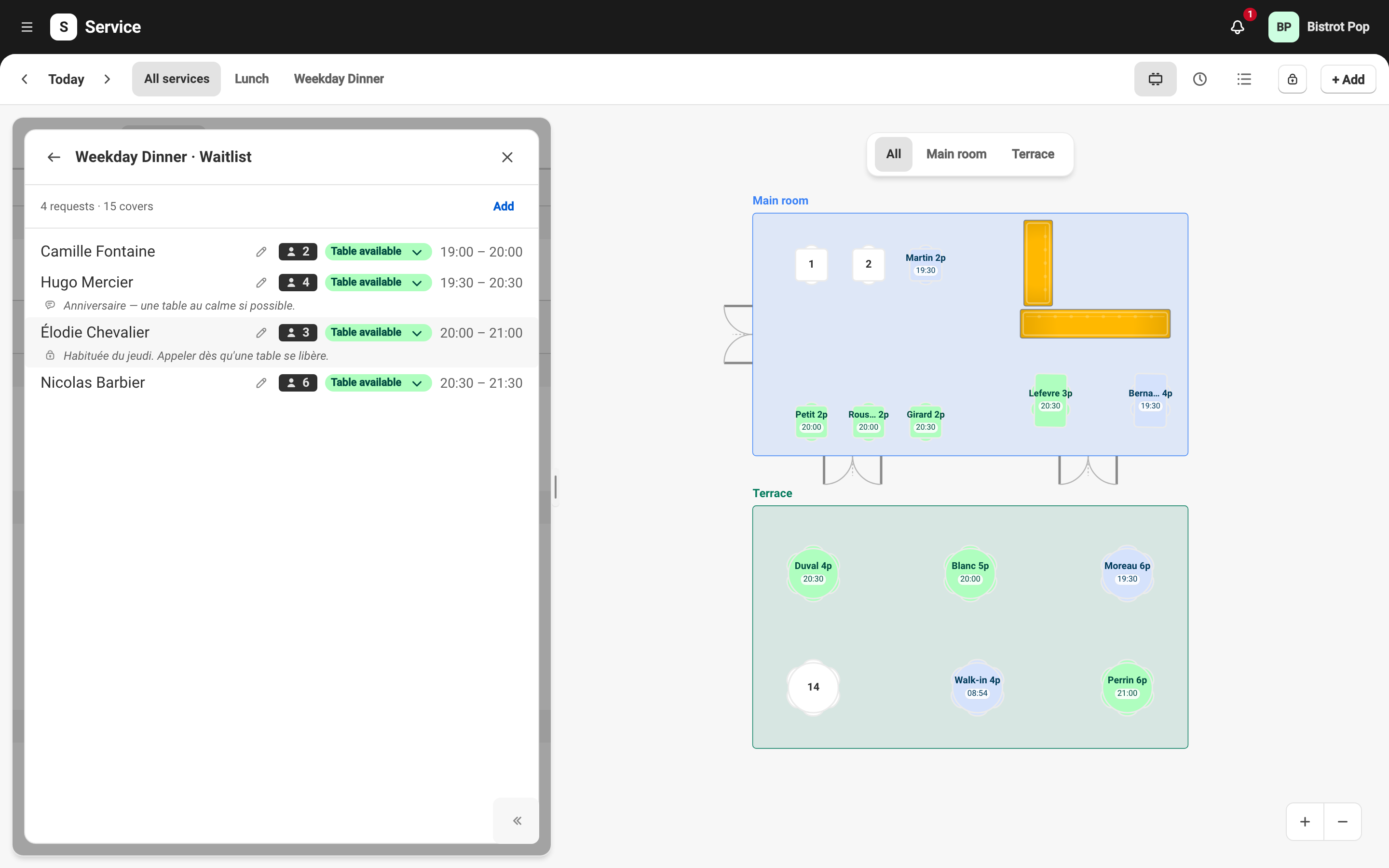
You stay in control
Automatic or subject to approval
You choose, service by service: the promotion goes out on its own as soon as a table matches, or it waits for your approval before anything reaches the guest.
Manual promotion
The queue stays visible from your back office. You can take any request from it and promote it yourself, without waiting for a table to free up.
No table held
A waitlist request books nothing and holds no table. Your dining room stays fully sellable right up until the promotion.
Related features
Ready to take back control of your reservations?
Join the restaurants who are done paying commissions.
Contact us